Changing Details of Approved Programs
It is recognised that some PIs may wish to modify observations after the ITAC-recommended queue and classical schedule has been approved by the Director. This might occur, for example, due to a change in scientific or technical priorities or a genuine mistake in the Phase I proposal (e.g. incorrect observing condition constraints).
Requests for change must be made by the PI to the Head of Science Operations for the relevant telescope (GN: atsuko.nitta at noirlab.edu; GS: joanna.thomas at noirlab.edu) and copied to the program's Gemini and National Gemini Office (NGO) contact scientists. Genuine or accidental differences between approved Phase I programs and the detailed Phase II observations may be also be identified by National Office or Gemini Observatory staff during verification. These too will be communicated to the Heads of Sci. Ops. and copied to the NGO.
If the change is "substantial", the Heads of Sci. Ops. will, at their discretion, contact the relevant ITAC member to seek a recommendation for approval or rejection of the change. Note that changes may affect other approved programs, by creating new duplicate observations or altering their likelihood of execution. Examples of substantial change include:
- Changes in the science goals, e.g. due to new development in the area. A detailed justification should be submitted with the request.
- Increases in the allocated time. Submit a detailed justification.
- Change in to a different instrument or different instrument mode. Submit a detailed justification.
Smaller changes would not normally trigger communication with the ITAC member, but still require contacting the appropriate Head of Science Operations for assessment. Examples include:
- Change of observing condition constraints (to better conditions, including any changes to airmass or hour angle constraints). Include a justification for the requested change.
- Change of science target (to an identifiably different source). Submit target name, coordinates in J2000 (RA hh:mm:ss.s, DEC dd:mm:ss), and a brief justification with the request. The targets will be checked for conflicts with other programs.
- Larger refinement of target coordinates (for the same source), when the adjusted coordinates trigger a warning from the OT. Submit target name, coordinates in J2000 (RA hh:mm:ss.s, DEC dd:mm:ss) with the request.
Changes that do not require approval:
- Adjustment of integration time between observations within the same Science Program, such that the total used time remains within the allocation.
- Refinement of observing technique such as changes in imaging filters, wavelength settings for spectroscopy, gratings and grism choices for spectroscopy. The Contact Scientist will inform the PI if it is judged that the changes are large enough to require approval from the Head of Sci.Ops.
- Adjustments of target coordinates that do not trigger a warning from the OT, such as offsets and dither patterns.
- Changes to observing conditions to the next worse bin, e.g. from IQ=70% to IQ=85%. These changes are typically chosen by PIs to increase the probability of obtaining data, if the PI determines that the science goals can still be met.
- Requests to observe at the average parallactic angle for GMOS observations. However, PIs should ensure that correct information is included in the phaseII definition to enable the observations to be executed correctly.
- Addition of, or changes to, calibration observations, including standard star observations.
Gemini Observatory will act on a request for change within seven days. Often the response time will be significantly shorter than 7 days. However, large lists of target changes or substantial changes in science goals may take up to 7 days for a decision. Requests for changes during a classical run can usually be accommodated if the PI notifies the Head of Science Operations of the need at least 7 days before the classical run begins. Final authority for resolving disputes over observation modifications rests with the Gemini Director.
Target of Opportunity Activation
Scheduling ToO Observations
Gemini North and South are accepting triggers for approved "Target of Opportunity" or ToO programs as described in the Call for Proposals. We recognize that many ToO programs require follow-up observations on various timescales. Every effort will be made to complete these observations but due to schedule (and weather) constraints this cannot be guaranteed.
Time Charging for ToO Programs
From Semester 2017A, Gemini is not carrying out detailed time balancing, per partner, from semester to semester. Observations executed on a ToO program are "charged" to the program in order to determine whether the program has remaining time, but any unused time at the end of the semester is lost.
ToO Trigger Types:
- "Standard" triggers: observations that, once triggered, can be executed more than 24 hours in the future. This is essentially identical to the normal queue mode except that the targets are not known in advance. Thus, observations will be placed in the queue based on science rank and observing conditions constraints. If you want a triggered observation to be considered under this mode, you must complete the timing constraints in the Observing Conditions OT component. The PI will be notified if the telescope is not available within that time frame, and will be given the option to change his/her trigger.
- "Rapid response" triggers: observations that need to be done within the next 24 hours. The minimum response time is about 20 minutes and these triggers can interrupt ongoing observations, both classical and queue. Each semester only a few programs are allocated "Rapid Response" status by the ITAC. Details of this mechanism are given below. The Gemini North and South schedules show the science and engineering blocks available; the schedule is subject to change at short or no notice. Daily information about instrument availabilities and configuration can also be found on the North and South configuration pages. Please contact your program's Contact Scientist or the Instrument Scientist if you need more detailed information on the availability of the telescope during a specific period.
All types of ToO observations can be prepared and submitted using the standard sync operations of the Observing Tool (OT). It is also possible to trigger observations programmatically using an Application Programming Interface (API). Template observations in the programs are copied, populated with the target and guide star information, and then triggered.
Phase II Preparation
The basics of ToO Phase II preparation are the same as for regular queue programs. However, in this case the PI needs to define template observations that will be used once the targets are known. For programs with standard triggers that require a limited set of instrument modes, PIs should prepare templates similar to normal Phase II preparation. Programs that observe more transient objects (e.g. SNe, GRBs) often use many instrument modes so have to have more triggering options. For these programs the contact scientist will often copy a set of standard templates into the program. Please ask your contact scientist for additional instructions.
The template observations must be prepared by the regular Phase II deadline before each semester so that they can be properly checked.
Template observations should be made for each instrument configuration that will be needed and should be stored in a folder called Templates. This template observations should include:
- Science target acquisition (with matching PA and FPU-long slit or IFU-for the Science observation)
- ToO type (only possible for programs with Rapid ToO status, see below)
- Science target (dummy) <-- can leave as (0,0)
- Guide star (dummy) <-- also could be left as (0,0)
- Complete instrument configuration
- Offset or instrument sequences as needed
- Observes
- interspersed GCAL flats and arcs as necessary
After being checked by NGO and Gemini staff, trigger template observations will have their status set to "On Hold" and the priorities set to the usual High, Medium, or Low. PIs should sync their programs and wait for the triggering event.
Each program has a ToO status based on the option ("None", "Standard", or "Rapid") approved during Phase I. The status is given at the main program level.
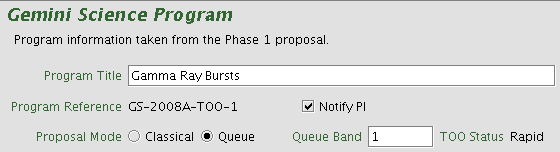
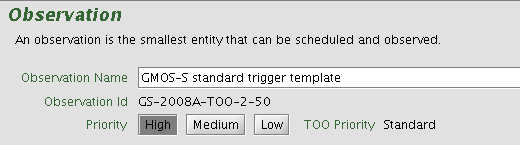
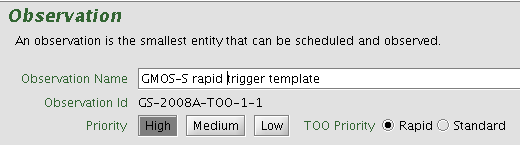
The TOO status is also shown at the observation level for programs that are allowed to trigger TOO observations. Programs with Standard TOO status can only trigger Standard TOOs while programs with Rapid TOO status can trigger either kind.
Standard TOO program
Rapid TOO program
Only one unique template for each configuration should be defined even if more than one observation with a given configuration may be triggered on a given night. If the URL-based triggering mechanism described below is not going to be used then an Observing Tool "Note" should be used to ask the Gemini contact scientist to make a number of copies of each template and leave them all at On Hold.
Triggering an Observation
Prepare observation
In most cases these steps are carried out using the Observing Tool. If the API is used then much of the preparation is done in PI-managed software that formats a URL string with all the required information. API documentation, scripts for automatically finding guide stars, formatting the URL, and submitting it are available on Github or by contacting Bryan Miller (bryan.miller noirlab.edu). The TOM Toolkit is also very useful software for this purpose that supports triggering Gemini observations.
- Prepare a finding chart
- Check Gemini North and South configuration web pages for available instruments and configurations
- Sync program if not using the URL-based rapid response triggering
- Select observation template(s)
- The template(s) must have status "On Hold"
- If not using API triggering
- Copy the template(s) to a new folder. The new observations will have status "On Hold".
- Edit the new observations according to the guidelines below.
- Update target component
- Fill in target name and coordinates
- Select guide star
- Update instrument component
- Exposure time
- Central wavelength (if appropriate)
- Position angle (if needed)
- Update timing constraints if necessary. If no constraints are entered then Rapid ToOs will be given a 24 hour timing window.
- Prepare note with extra details of the observation. For Rapid Response triggers the notes should include:
- Time of slew (UT), either
- Slew immediately
- Slew when convenient within the next M minutes
- Slew as close to HH:MM UT as possible
- Slew within T hours after obsid [N] complete
- Slew before time (UT) up until when the observation should be active
- Designated contact information
- Name of contact person
- Phone number
- Video IP (if available)
- e-mail address
- Acquisition information
- URL of finding chart if not submitted as a File Attachment
- Weather caveats and other information
- Time of slew (UT), either
Submit observation
- OT triggering
- Upload finding charts using the File Attachment facility.
- Change the status of the observations to be triggered from "On Hold" to "Prepared."
- Sync the program to the Gemini database.
- API triggering
- The PI software sends the URL string to the appropriate web socket.
- The PI software sends the URL string to the appropriate web socket.
Data Collection and Packaging
For Standard triggers the observations will be scheduled at the appropriate time in the queue. For Rapid Response triggers, the observers are notified of the triggers immediately and respond according to the timing instructions given. If the observers have any questions about the observtion then they may get clarification from the PI contact given in the note. If the observation cannot be done then the reasons will be added to the note.
Raw data files usually arrive at the Gemini Observatory Archive within a few minutes of being taken and are accessible by the PIs. For Rapid Response programs the observer will send an e-mail to the PI contact announcing that data is available.
Non-Sidereal Targets
Starting with the 2016B OT all nonsidereally tracked targets must be specified using ephmerides.
Non-sidereal objects may be specified in three ways, depending on whether the object is listed in the JPL/Horizons database, and whether non-sidereal tracking is desired. In all cases, the minimum non-sidereal target definition should include approximate coordinates for the object midway through the semester for queue planning purposes as well as an entry for the guide probe of interest. The nighttime observer will then update the object coordinates and choose a guide star based on the current coordinates. Nearly all non-sidereal objects can be supported --- we have observed Near-Earth Asteroids closer than the moon.
Nonsidereally Tracked Objects in the JPL/Horizons database:
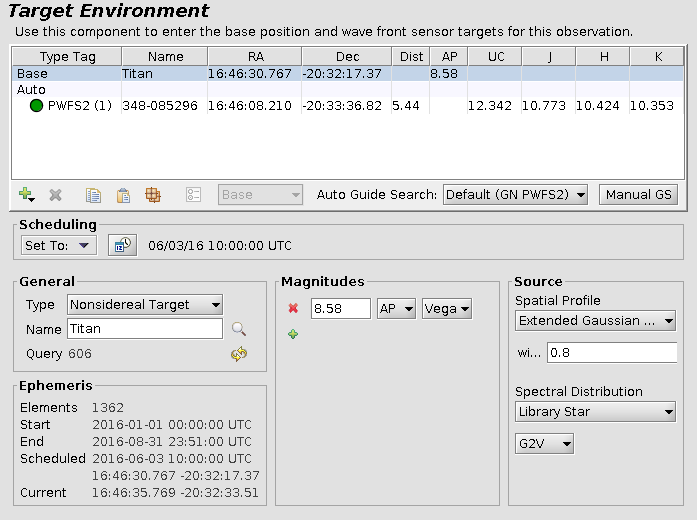
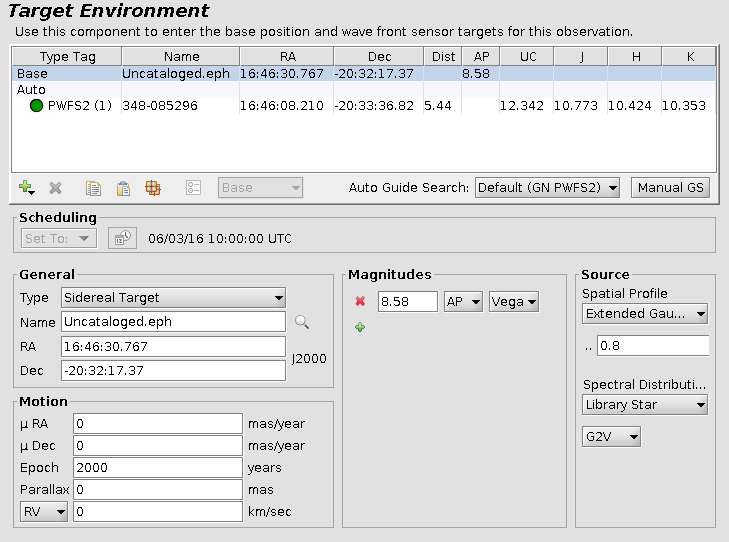
Non-sidereal objects listed in the JPL/Horizons database may be queried by the OT if an internet connection is active. In the "General" section of the Target component select "Nonsidereal Target" as the type, enter the object name, and click the magnifying glass to resolve the target name (objects should be referred by name rather than number if possible to minimize confusion). This will pop up a menu to select whether the target type is a Comet, Asteroid, or Major body (planet or satellite). If the target name matches multiple known objects then you will need to choose the correct one. The OT will remember the unique target identifier (listed below the name) for future coordinate updates. When the target has been uniquely identified the OT will download and store a low-resolution ephemeris from JPL/Horizons for queue planning purposes. The OT will automatically set the "Scheduling" time to the middle of the semester. If the observation has a single timing window you may want to set the Scheduling time to be inside that window, otherwise the nighttime observer will update the Scheduling time a few minutes before slewing the telescope, allowing the OT to automatically select a guide star. Tracking will occur at the non-sidereal rate, although please be sure to look below for non-sidereal tracking details for your guide probe, particularly limitations of the GMOS OIWFS. An example of a nonsidereally tracked observation of Titan appears below.
Nonsidereally Tracked Objects NOT in the JPL/Horizons database:
Objects not yet cataloged by JPL/Horizons require a user-supplied machine-readable ephemeris which needs to be produced in a very specific format and should be tested by the observatory prior to observation. This method requires additional operational resources for testing so please contact your NGO and CS if you suspect that you will need this functionality.
The ephemeris format is: Date(UT) HR:MN JD(UT) R.A. DEC dRA/dt*cosD d(DEC)/dt, where R.A. and DEC are J2000 astrometric right ascension and declination of the target center adjusted for light-time, and dRA/dt*cosD and d(DEC)/dt are the rate of change of target center apparent RA and DEC (airless) in arcseconds per hour. The header shown below is required to tell the Telescope Control System (TCS) the frame of reference. The TCS expects the JD, RA, Dec and track rates to start at (zero base) columns 19, 40, 54 and 69. The RA hours and Dec degrees should be zero-padded ("% 02d"). There must be no "60.000" in the RA or DEC seconds columns, and there must be no blank lines or lines with text between $$SOE and $$EOE (e.g. ">..... Daylight Cut-off Requested .....<"). Ephemeris files may skip daylight hours to minimize the size of the file, which has a maximum length of 1440 lines. An abbreviated example is displayed below, and a full-length example ephemeris file may be downloaded here: Titan.eph.
***************************************************************************************
 Date__(UT)__HR:MN Date_________JDUT     R.A.___(ICRF/J2000.0)___DEC dRA*cosD d(DEC)/dt
***************************************************************************************
$$SOE
 2013-Jan-01 16:00 2456294.166666667 Am  14 30 58.5670 -12 25 00.360 8.861123  -2.58933
 2013-Jan-02 15:00 2456295.125000000  m  14 31 13.2425 -12 25 56.391 9.525960  -2.34342
 2013-Jan-02 16:00 2456295.166666667 Am  14 31 13.8926 -12 25 58.733 9.522656  -2.32523
 2013-Jan-03 15:00 2456296.125000000  m  14 31 29.7369 -12 26 49.967 10.32543  -2.19019
 2013-Jan-03 16:00 2456296.166666667 Am  14 31 30.4417 -12 26 52.159 10.32590  -2.17690
 2013-Jan-04 15:00 2456297.125000000  m  14 31 47.5724 -12 27 41.351 11.13377  -2.15827
 2013-Jan-04 16:00 2456297.166666667 Am  14 31 48.3324 -12 27 43.514 11.13236  -2.14981
 2013-Jan-05 15:00 2456298.125000000  m  14 32 06.6554 -12 28 33.383 11.82130  -2.23958
 2013-Jan-05 16:00 2456298.166666667 Am  14 32 07.4622 -12 28 35.631 11.81295  -2.23534
 2013-Jan-06 15:00 2456299.125000000  m  14 32 26.6930 -12 29 28.560 12.27522  -2.41416
 2013-Jan-06 16:00 2456299.166666667 Am  14 32 27.5303 -12 29 30.984 12.25568  -2.41308
 2013-Jan-07 15:00 2456300.125000000  m  14 32 47.2249 -12 30 28.771 12.40569  -2.65160
 2013-Jan-07 16:00 2456300.166666667 Am  14 32 48.0707 -12 30 31.433 12.37181  -2.65221
 2013-Jan-08 15:00 2456301.125000000  m  14 33 07.6681 -12 31 35.057 12.15404  -2.91218
 2013-Jan-08 16:00 2456301.166666667 Am  14 33 08.4963 -12 31 37.980 12.10425  -2.91263
 2013-Jan-09 15:00 2456302.125000000  m  14 33 27.3769 -12 32 47.412 11.50484  -3.14873
 2013-Jan-09 16:00 2456302.166666667 Am  14 33 28.1603 -12 32 50.570 11.43964  -3.14695
 2013-Jan-10 15:00 2456303.125000000     14 33 45.7250 -12 34 04.650 10.49977  -3.31122
 2013-Jan-10 16:00 2456303.166666667 Am  14 33 46.4393 -12 34 07.967 10.42232  -3.30518
$$EOE
***************************************************************************************
To define a non-sidereal target with a user-supplied ephemeris select "Sidereal Target" in the Target "Type" pull-down menu, and enter the name of the ephemeris file as the target (e.g. "Uncataloged.eph"). Attach the ephemeris file to your program using the File Attachment tab of the Gemini Science Program component in the Program Editor. Tracking will occur at the non-sidereal rate, although please be sure to look below for non-sidereal tracking details for your guide probe, particularly issues with the GMOS OIWFS. An example of non-sidereal tracking with a user-supplied ephemeris file appears below for Titan.
Sidereally Tracked Objects:
If observations of non-sidereal objects are desired with tracking at the sidereal rate, then the target component must be set up as a standard J2000 sidereal target. An ephemeris for the target should be included in a note to the observer including UT date and time, J2000 RA and Declination, and any other information relevant to the observer (for instance magnitude for objects with large flux variations). The observer will use this note to determine the object position and select a guide star at the time of observation. If the object is recognized by Horizons, then a dummy "User" target may be created for the observer to provide the correct coordinates.
Peripheral wavefront sensor guiding with non-sidereal tracking:
For non-sidereal tracking and guiding with the peripheral wavefront sensors, the target should be specified as discussed above, and PWFS2 must be selected in the "Auto Guide Search" drop-down menu. If the target is specified with a user-supplied ephemeris please make sure that the RA and Dec are updated for a point in the middle of the semester. The nighttime observer will update the coordinates prior to the observation and AGS will select a new guide star. When using the peripheral wavefront sensors with GMOS, it is likely that some portion of the field will be vignetted by the probe arm, so please specify the clear aperture required in a note to the observer.
Altair guiding with non-sidereal tracking:
For non-sidereal tracking and guiding with the peripheral wavefront sensors, the target should be specified as discussed above, and AOWFS must be selected in the "Auto Guide Search" drop-down menu. If the target is specified with a user-supplied ephemeris please make sure that the RA and Dec are updated for a point in the middle of the semester. The nighttime observer will update the coordinates prior to the observation and AGS will select a new guide star. If guiding on a non-sidereal object the guide star must be defined manually. Use the green "+" to add an "Altair AOWFS" target and configure it as described above. If guiding on the science target, the AOWFS target should be the same as the Base target.
GMOS & Flamingos-2 OIWFS guiding with non-sidereal tracking:
The GMOS & Flamingos-2 OIWFS have severe limitations for tracking non-sidereal objects, and its use is not appropriate for fast-moving objects. Electronic non-sidereal tracking with the OIWFS can be performed for only 1 arcsecond of total motion on the sky, so science exposures (including readout) must be chosen to complete within this range of motion. Following each exposure, a dither must be performed using the offset iterator in order to "reset" the OIWFS star to the center of the OIWFS field of view. This should be done with the offset iterator. If this 1 arcsecond of motion is not sufficient due to the high rate of motion of the object or the use of long exposure times, then one of the peripheral wavefront sensors should be used instead.
GeMS with non-sidereal tracking:
GeMS does not currently support non-sidereal tracking.
Unguided:
In certain fields and conditions a guide star may not be available, and observations of rapidly moving objects (>~10"/min) with PWFS2 may only permit guiding for very short periods before it is necessary to select a new guide star (which will incur additional acquisition overheads). In these situations, one may elect to execute the observation unguided (using either sidereal or non-sidereal tracking), with the caveat that the delivered image quality will suffer. To set up an unguided observation go to the Target component and use the green "+" to add an empty "Guide Group", and then change the Guide Group Name from "Manual" to "Unguided".
Archive Searches:
When searching for comet data in the Gemini Observatory Archive you may need to replace slashes in the target name with the URL equivalent "%2F". For example "C/2019" becomes "C%2F2019".
Finding Charts
By default the observer will use the optical Digital Sky Survery or the 2MASS image of the field in the Position Editor to identify the target during acquisition. An additional finding chart should be provided any time there are uncertainties about the identity of the target, e.g. crowded fields or very faint sources. If in doubt, submit a finding chart!
Finding charts should be submitted to Gemini using the File Attachment tab of the Gemini Science Program component in the Program Editor.
Finding charts should follow these guidelines:
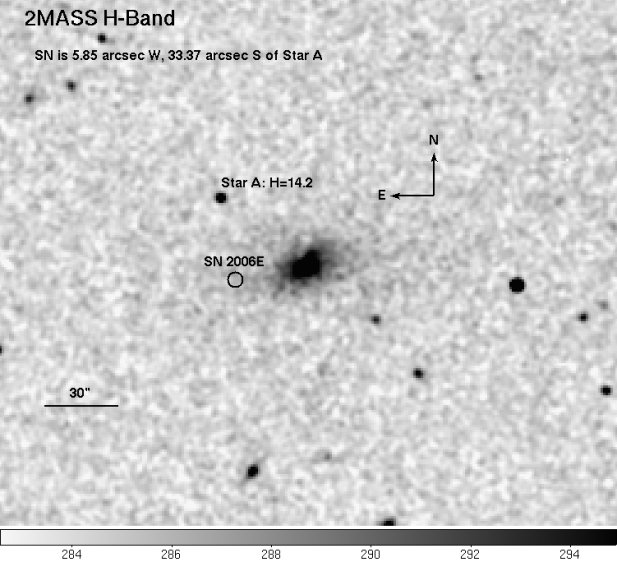
- The target position must be clearly and correctly indicated.
- Indicate if the target is a transient and whether it is actually displayed on the chart.
- The name of the file should clearly indicate the target name
- The description in the File Attachment tab should be in the format '[N1,N2, ...] Finder' where N1, N2, etc are the obsid numbers of the observations associated with that finding chart.
- North and East must be clearly indicated. It is best to follow the convention of North up and East to the left.
- The image scale must be indicated with a scale bar annotated with the length in arcseconds or arcminutes.
- The filter or wavelength range of the image must be indicated.
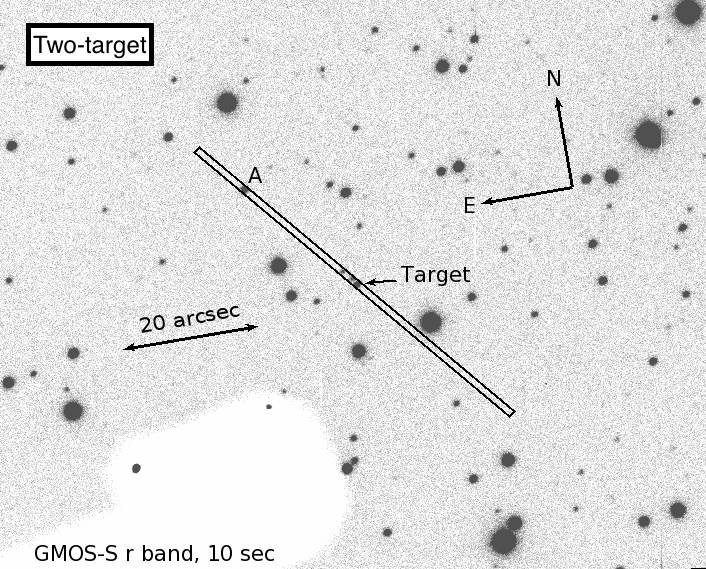
- Longslit or IFU finding charts should show the position of the slit or IFU field.
- The entire instrument field-of-view should be shown.
- The recommended file formats are GIF, JPEG, TIFF, and PPM (pgm, ppm, png). Postscript and PDF are also acceptable. FITS format should not be used for finding charts.
The following is an example of a good finding chart. The bandpass and source of the image is given and the orientation, scale, target, and offset star are clearly marked.
The following is an example of a good spectroscopic finding chart. The orientation is given and the two objects that should be in the slit are clearly marked.
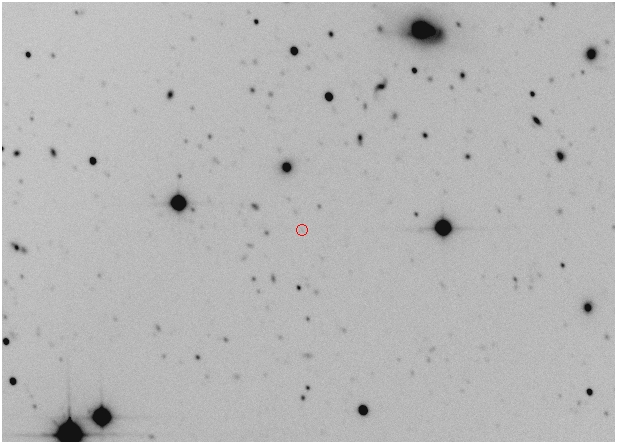
The following is a poor finding chart. The target is indicated but the orientation, scale, bandpass and instrument field-of-view are not given.
Queue Planning and Execution
This page contains the following sections:
- Queue Management and Planning
- Execution of the queue
- Current Modifications to the Gemini Queue Operations
Queue Management and Planning
At each telescope a team of queue coordinators (QC) is scheduled to plan the queue nights. Three of these at each site also serve as the core-QCs, who have the responsibility to oversee the queue execution over the longer term and ensure priorities are set consistently and decisions are taken correctly to optimize the program completion. The queue planning is distributed between about 10 staff members, who also have many other duties. About 20-25% of their time is currently used on planning and managing the queue.
The QCs rely on the content of the Observing Database (ODB) to ensure they have a full overview of the queue content. On a nightly basis the scheduled QC uses the Queue Planning Tool (QPT) shown below to construct the plan. Several variant plans are made for different sets of observing conditions, e.g. photometric & good seeing (CC=50% IQ=70%), cirrus & good seeing (CC=70% IQ=70%), cirrus & poor seeing (CC=70% IQ=85%), etc. Thus, the night is pre-planned for not only the most likely conditions but also changing conditions should they happen. The QC uses available weather forecasting and satellite images of cloud patterns to aid the decisions about how to optimize the plan for the night.
The top-level principles guiding the queue management and planning are (1) use the largest possible fraction of the time on completing band 1 and 2 programs, and (2) make the best use of all telescope time. These principles translate to the following concrete guidelines for the queue coordinators:
- Within a ranking band all programs have equal priority.
- Aim to complete started programs.
- Do not lose early targets in band 1 and band 2 programs. This can override band ranking if needed to ensure Band 2 targets are observed.
- Limit the execution in better than requested conditions, in order to enable completion of the more demanding band 1 and 2 programs.
- Select Band 3 programs to start based on: probability of reaching the PI-defined minimum useful time, probability of completion, complementary to band 1 and 2 in conditions and RA, and connection to a thesis program.
In addition to these principles, the queue coordinators plan with the completion rate goals in mind. The goals are endorsed by the Gemini Board and focus on reaching high completion rates in band 1 and 2, and to obtain publishable datasets for started band 3 programs. The completion rate goals are detailed on the operations statistics page.
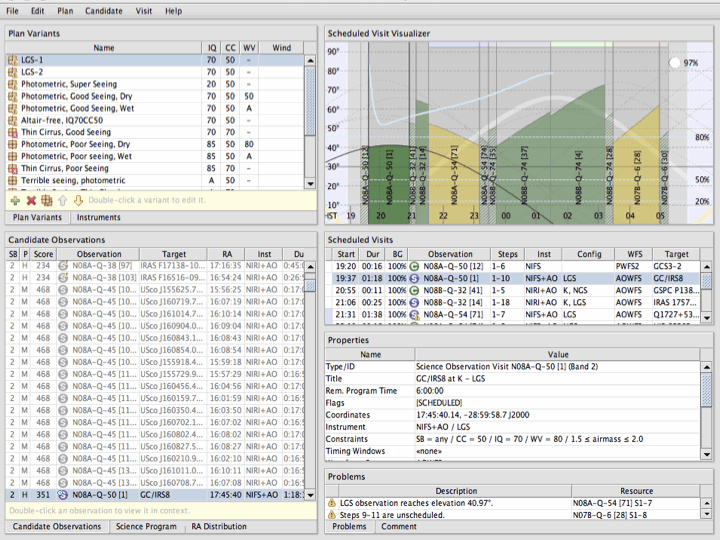
Figure 1: Screenshot of the main view of the Queue Planning Tool. Top left lists the plan variants for the night, matching different observing conditions. Bottom left lists observations available to be scheduled. Top right shows the elevation plot for the observations scheduled in the selected plan variant. Below the elevation plot is a listing of those observations, followed by detail for the selected observation.
Execution of the queue – A night at Gemini
A queue night at Gemini usually has only two staff members present, a Science Operations Specialist (SOS) who operates the telescope and provides technical expertise to assist the Observer with the instruments, and an Observer (either another SOS or a staff astronomer) who operates the instruments and exectutes the planned queue observations. The team will assess the observing conditions using available monitoring (seeing monitors, all sky cameras, or by just plain looking at the sky). They will then choose the appropriate plan variant put together by the QC and execute the observations as laid out in the plan. A typical plan contains observations from three to five different queue programs in order to optimize the use of the night.
In the event of changing conditions, the Observer will switch plan variant as needed to avoid taking data in poorer conditions than required and to minimize the time spent taking data in better than requested conditions. Switching between the three or four mounted instruments is accomplished by moving a fold mirror and happens in a few minutes during the slew to the new target. Currently 75-80% of all queue nights use two or more instruments. Due to the large demand for GMOS at both sites there are nights in dark time and good conditions during which only GMOS is used.
If technical problems occur, the Observer and SOS can contact both engineering and science staff for assistance. In case technical problems are confined to one of the mounted instruments, the troubleshooting can be deferred to the next day and the queue execution will simply switch to another instrument, limiting the technical time loss at night.
As the data are taken, the Observer will perform a preliminary assessment of the data quality in order to make decisions about whether the observation is completed correctly and also to detect any technical problems. All data are transferred directly to the Gemini Archive and are usually accessible to the users within minutes of being obtained. This is essential for the timely delivery of data from Rapid Target-of-Opportunity (ToO) observations. Final data quality assessment is done the day after the observations by staff members working at sea-level. This is a more thorough assessment to verify: (1) the correctness of the headers; (2) the observing condition constraints are met; (3) the necessary calibrations have been obtained; and (4) that the data have successfully arrived at the archive. If needed, header corrections will be made and the data re-ingested. Although not required to obtain the data, program data are grouped into “packages” on a regular basis (nominally weekly) and provided to the PI for convenience in downloading the data.
Current Modifications to the Gemini Queue Operations
Gemini is in the process of assessing how to make the management, planning and execution of the queue less demanding of staff effort. In this process, staff effort will be used for development and testing of improved science operations software. In order to have effort available for this work and to optimize where effort is spent, the Observatory will put in place some changes to the queue execution, that are intended to save effort and have minimal impact on the science productivity of Gemini. The first changes took effect in early 2010B. The changes have been endorsed by the Operations Working Group and/or the Gemini Board, and will remain in effect until improved science operations software become available, or beyond that if the savings in effort are still necessary and/or if the impact on the science productivity of Gemini is found to be negligible. Additional changes may be required and will in that case be described on this page. The current changes and their expected impact on Gemini users are summarized in the following sections.
- No queue planning for poor observing conditions (effective Sept 2010 - present)
QCs will no longer produce plan variants for thick clouds (CC=80 or worse combined with any other observing conditions) and very poor seeing (IQ=Any combined with any other conditions). The QCs will ensure that programs are activated/deactivated in the ODB to optimize completion of band 1-3 programs using these conditions. The Observer will select appropriate observations from the active programs in the ODB for observation in these conditions. Designating programs as "active" and "inactive" is a dynamic process and the selected programs will likely change frequently throughout the semester. If necessary, Band 1 and 2 programs using poor conditions may still explicitly be scheduled to ensure completion.
This change may lead to somewhat lower efficiency on the sky in these poor observing conditions, which in turn may affect the completion rates for band 3 and poor weather programs.
- Simplified detailed time accounting (effective Sept 2010 - July 2011)
The principles of the telescope time accounting are summarized on the time accounting page. To save effort previously used in achieving accuracy on the few-minutes level, QCs will be asked to apply a “too small to worry about” criterion to the nightly time accounting consistency. Anything that affects time accounting with less than about 15min/night (technical faults, weather etc.) or about 5min/prg on a given night is considered to be in this category. This change may result in small “overcharges” (or “undercharges”) in some programs. It is not expected that these will affect the partner imbalances. Below a total of 30min or 10% of a program length (whichever is smallest) QCs will not follow up on PI/NGO questions about time accounting unless requested by local Head of Science Operations. The QCs will allow small overruns of allocated time to complete programs as planned. For reference, in semesters 2009A-2010A the average time usage to complete a program was 104% of the allocated program time. This change is superseded by the following change as of August 2011.
- Suspension of time accounting corrections less than one hour (effective from August 2011)
Effective August 2011 (at the start of 2011B) Gemini will suspend telescope time accounting corrections, as well as corrections to internal night-logs and fault reports for all corrections less than 1 hour of duration. The change was approved by the Board in early June 2011. Statistics from four previous semesters show that the effect on the partner imbalances is minimal as the corrections are approximately distributed as the nominal partner shares. The effect is in all cases expected to be less than 3.5% of a partner's share in a given semester.
As a consequence of the change, the program time accounting is less accurate and programs may appear to run out of allocated time before they are completed. To avoid stopping executions of programs prematurely, NGO support and Contact scientists must ensure that each program contains a top level note with the title “Phase II-filling” that states how the program time was filled, choosing from one of these cases
- Phase II was filled to the allocated time, execute all science observations.
- Phase II was overfilled, of the N science observations execute only M of them (this option is used when the PI overfills the program to provide flexibility in the queue execution).
- Phase II was not filled as targets are not known (use for ToO programs).
- The phase II was filled to only N hours, as the PI wants to assess data from the first observations before defining observations for the remainder of the allocation.
The note should be dated and carry the initials of the NGO and/or CS who added the note. In the last two cases, the NGO/CS edits the note as new observations are defined. The phase II definitions use the average overhead times (acquisitions and readout) to calculate the planned time. Thus, on average the planned time for an observation is a good approximation of the actual time needed for that observation.
The QCs have been given instructions in how to avoid stopping execution of a program before it is complete. The QCs depend on the notes described above being present in the programs. The PI and NGO for a program can request a review of the time accounting for a given program, if they believe that the execution of a program has been stopped before completion due to missing time accounting corrections. The Head of Science Operations or core-QC can decide to approve execution of the remaining observations without spending resources on an extensive review of the time accounting. The Head of Science Operations and core-QCs will respond to requests for review within one week.
- No band 4 (poor weather) time accounting, program revisions and data quality assessment (effective Sept 2010-present)
QCs will not adjust time accounting for band 4 (poor weather) programs or revise phase IIs for the programs to enable re-observation of targets. Quality assessment (QA) checks will not be done for band 4 data. All data retain the QA state the Observer may have set, or left undefined if the Observer did not set the state. It is possible that some QA states may be incorrect. The Observer will still add comments to the e-obslog as relevant for these observations, and daytime staff members will still ensure that all data taken arrive at the GSA.
If re-observations of targets are needed, or calibrations are missing, for band 4 (poor weather) programs it will be the responsibility of the PIs to revise phaseIIs to add the required observations as copies of the existing observations. The NGOs can assist as needed. The observations should be clearly marked as a copy in the title and will be set to “ready” by CS/QC without further checks. Re-observations will only be executed if the PI defines them. It is recommended that Band 4 PIs fetch their program from the ODB and download the data from the GSA on a regular basis to monitor the progress of their programs.
- Closing the telescope based on forecast for very poor conditions (effective from Sept 2010-present)
The local Head of Science Operations may choose to close the telescope or call off use of the laser guide star system based on early weather forecasts if these are sufficiently poor. At Gemini North it is expected that the decision can be made based on the morning forecast, thereby saving staff effort for the day/night. In addition, the night crew will be given more leeway to close the telescope if observations in poor conditions are extremely inefficient or are putting unnecessary risk on the telescope or instruments. The change may result in fewer poor weather programs being executed.